
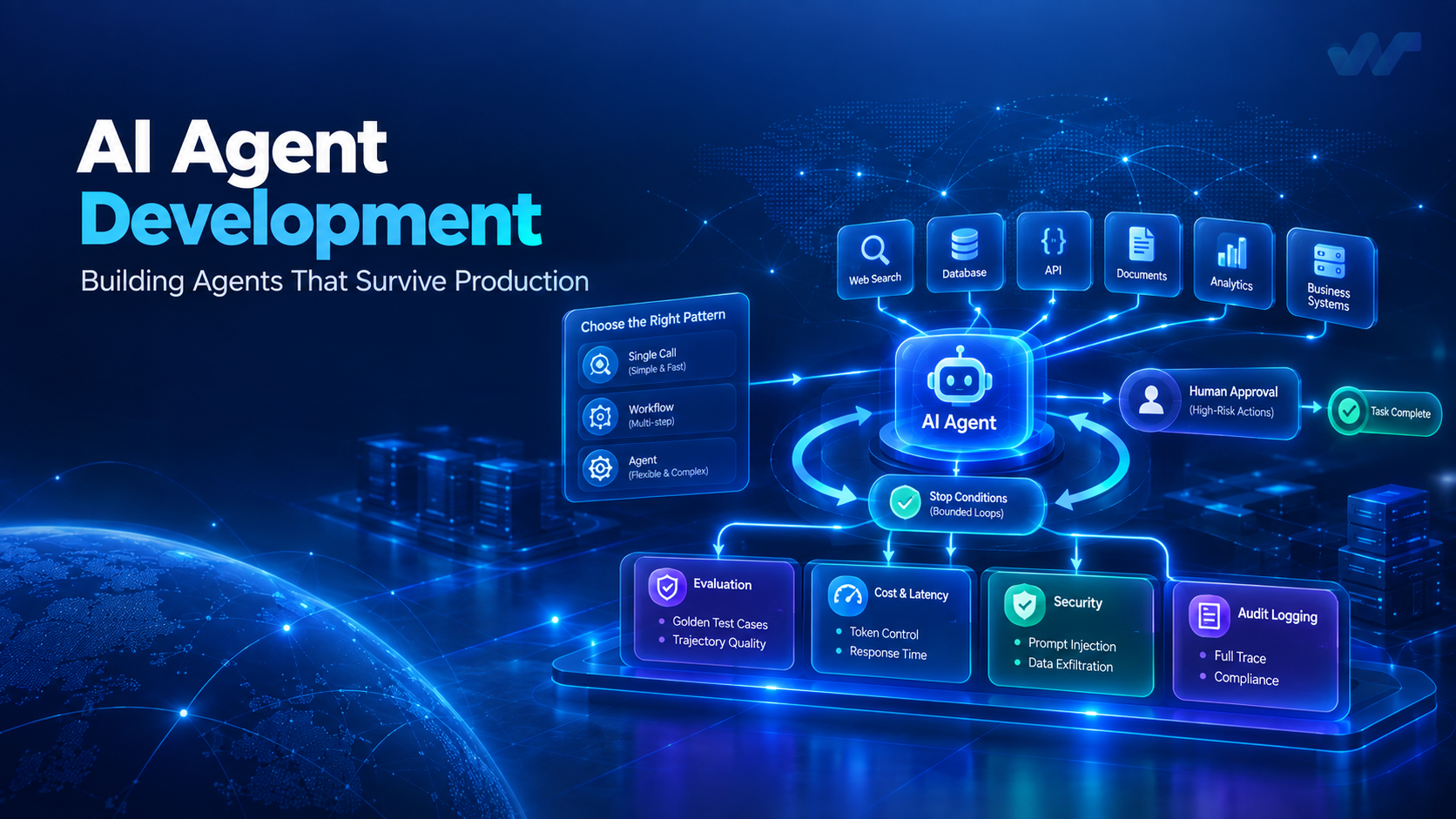
An AI agent is a language model in a loop, with tools it can call and a condition that tells it to stop. That is the whole idea. Everything difficult about putting one into production follows from it: the loop means the system chooses its own path, the tools mean it acts on real systems, and the stopping condition is the only thing standing between a useful result and a very expensive one.
Most agent projects that fail do not fail on model quality. They fail because a non-deterministic system was built with the habits of a deterministic one.
First: do you need an agent?
Three patterns get called "AI agents". They have very different costs, and picking the heaviest one by default is the most common mistake we see.
| What it is | Use when | Cost and risk | |
|---|---|---|---|
| Single call | One prompt, one response | The task is well defined and one-shot: classify, extract, summarise, rewrite | Lowest, fully predictable |
| Workflow | Fixed sequence of model calls, orchestrated by your code | Steps are known in advance; the model does the judgement, your code does the control flow | Moderate, still predictable |
| Agent | Model chooses which tools to call, in what order, until done | The path genuinely cannot be known in advance | Highest; latency and cost vary per run |
The rule we use: if you can draw the flowchart, write the flowchart. A workflow with three model calls in a sequence you control is cheaper, faster, easier to debug and easier to evaluate than an agent that discovers the same three steps at runtime. Reach for an agent when the branching is genuinely open — investigating an anomaly, answering a question that needs an unknown number of lookups, working through a task where step three depends on what step two found.
A great deal of what is marketed as agentic is a workflow wearing a costume.
Tools are the actual interface
The prompt gets the attention. The tools decide whether it works.
Design tools for a model, not for a developer. A model has no documentation, no type checker and no colleague to ask. search_orders(customer_id, status, date_from, date_to) is good. query(sql) is a security incident with a friendly name. Narrow, named parameters constrain the space of wrong calls.
Name and describe them as if the description is the only documentation, because it is. The description is read every single time. State what the tool does, when to use it, when not to, and what it returns. "Returns orders. Use for order history questions. Does not include cancelled orders unless include_cancelled is true" prevents a whole class of failure.
Return structured, bounded output. A tool returning ten thousand rows has spent your context window and taught the model nothing. Paginate. Summarise. Return counts with samples.
Make errors instructive. Error: 400 teaches nothing and the model will retry identically. No customer found with that ID. Use search_customers with a name or email first. turns a failure into the next correct step.
Least privilege, always. Every tool should run with the narrowest permission that does the job, scoped to the acting user. An agent is not a trusted service; it is a component that decides what to call based on text it read somewhere.
The loop, and stopping
The loop is where cost and reliability live.
Hard limits. Maximum iterations, maximum wall-clock, maximum total tokens. Not as safety nets — as design parameters. A loop without a ceiling will eventually find the input that makes it run until something else breaks.
Detect no-progress, not just failure. The characteristic agent failure is not a crash; it is calling the same tool with the same arguments three times, or alternating between two tools forever. Track the call signature. Break the loop and surface what happened rather than burning the budget.
Make stopping explicit. The model should have a way to say "done, here is the answer" and a way to say "I cannot do this". Without the second, it will invent a plausible answer rather than admit failure — and a confident wrong answer is worse than a refusal in every business context we work in.
Evaluation: the part that is genuinely different
You cannot test an agent the way you test a function. Same input, different path, possibly different output. That does not mean you cannot test it — it means the tests look different.
Build a golden set early. Thirty to fifty real cases with known-good outcomes, drawn from actual usage, not imagined. This is the single highest-value artefact in an agent project and the one most often skipped. Without it, "did that prompt change help?" is unanswerable and every release is a guess.
Evaluate the trajectory, not only the answer. For an agent, how it got there matters. Did it call the right tools? In a sensible order? Did it make redundant calls? An agent that reaches the right answer after eleven tool calls is one input away from not reaching it at all.
Score what you actually care about. Task completion, factual grounding (is every claim supported by something a tool returned?), tool-call correctness, cost and latency per run. Aggregate scores hide the failures that matter.
Gate releases on it. A prompt change is a code change. Run the golden set, compare to the previous version, block a regression. Prompts are edited casually precisely because they look like text, and that is why they need the same gate as anything else that ships.
Cost and latency are design constraints
Agent cost is per run and it varies — which means it can be fine in testing and alarming in production.
The levers, roughly in order of effect: use a smaller model for the easy calls (classification, extraction and routing rarely need your largest model); cache aggressively, since the system prompt and tool definitions are identical every iteration and prompt caching is a large, cheap win on a loop; shrink tool output before it re-enters the context; parallelise independent tool calls; and cap the loop, which is the backstop for everything else.
For latency, stream partial output where the interface allows it — an agent that takes twelve seconds feels very different if the user can see it working.
Security: assume the input is hostile
This is the part that is consistently under-built, and the risk is structural rather than incidental.
Prompt injection through retrieved content. If your agent reads a document, a web page, a support ticket or an email, then an attacker who can write to any of those can write instructions the model may follow. This is not hypothetical, and no prompt wording reliably prevents it. Defend structurally: treat all retrieved content as untrusted data, never as instruction; keep tool permissions narrow enough that following a malicious instruction cannot do much; require confirmation for consequential actions; and never put credentials where a model can read them.
Data exfiltration. An agent with both a data-reading tool and a network-calling tool can be induced to combine them. Consider whether those two capabilities need to exist in the same agent at all.
Audit everything. Log every tool call with its arguments, result and the user on whose behalf it ran. When someone asks why the system did something six weeks ago, that log is the only answer that exists.
Human-in-the-loop as architecture
The most reliable agents we run are not the most autonomous. They are the ones where a human sits at the right point in the loop by design.
The pattern: the agent does the work that is slow and mechanical — gathering, cross-referencing, drafting, proposing — and a person approves the step that has consequences. Not a person reviewing everything, which just moves the bottleneck. A person reviewing the specific action that writes to a ledger, sends to a customer, or changes a record.
This is the design we use in WaveAI, and it is the reason those systems are trusted with real work. Autonomy is not the goal; a correct outcome that someone is accountable for is the goal.
A shipping checklist
- The task genuinely needs an open path, not a workflow you could draw.
- Every tool is narrow, well described, least-privilege and returns bounded output.
- Tool errors tell the model what to do next.
- Iteration, time and token ceilings are set deliberately.
- No-progress detection breaks repeating loops.
- The agent can say "I could not do this".
- A golden set of thirty or more real cases exists and runs in CI.
- Trajectories are evaluated, not just final answers.
- Retrieved content is treated as data, never as instructions.
- Consequential actions require confirmation.
- Every tool call is logged with arguments, result and acting user.
- Cost and latency per run are monitored in production, not only in testing.
The short version
Use the lightest pattern that solves the problem. Spend your effort on tool design and evaluation rather than on prompt wording — that is where reliability actually comes from. Put a ceiling on the loop. Treat everything the agent reads as untrusted. And keep a human at the point where the system does something it cannot take back.
If you are building something in this space and want to talk it through with people who have shipped it, we are here.
Get posts like this by email
Occasional engineering notes from the team. No marketing, and easy to leave.
Keep reading
Database Migration Without Downtime: A Practical Guide for Production Systems
Learn how to migrate production databases with minimal downtime, consistent data, and a reliable rollback plan. Explore schema changes, replication, data validation, and practical strategies for MySQL and PostgreSQL migrations.
14 min readEngineeringThe Hidden Cost of Enterprise Software: What Businesses Should Evaluate Before They Build, Buy, or Scale
Enterprise software costs go far beyond licenses and development. Discover how integration complexity, technical debt, infrastructure, and security affect total cost of ownership—and how to make smarter build, buy, or integrate decisions.
12 min readNext post
Announcing WaveGrid: IoT Fleet Management at Enterprise Scale
Our newest product manages tens of thousands of connected devices — vehicles, meters, sensors — with edge buffering so a dropped connection never means lost telemetry.