
We run the Wave suite on Kubernetes. We also regularly tell teams not to adopt it yet. Both positions come from the same observation: Kubernetes is very good at a specific set of problems, and if you do not have those problems it will hand you a new set instead.
This post is about telling the difference.
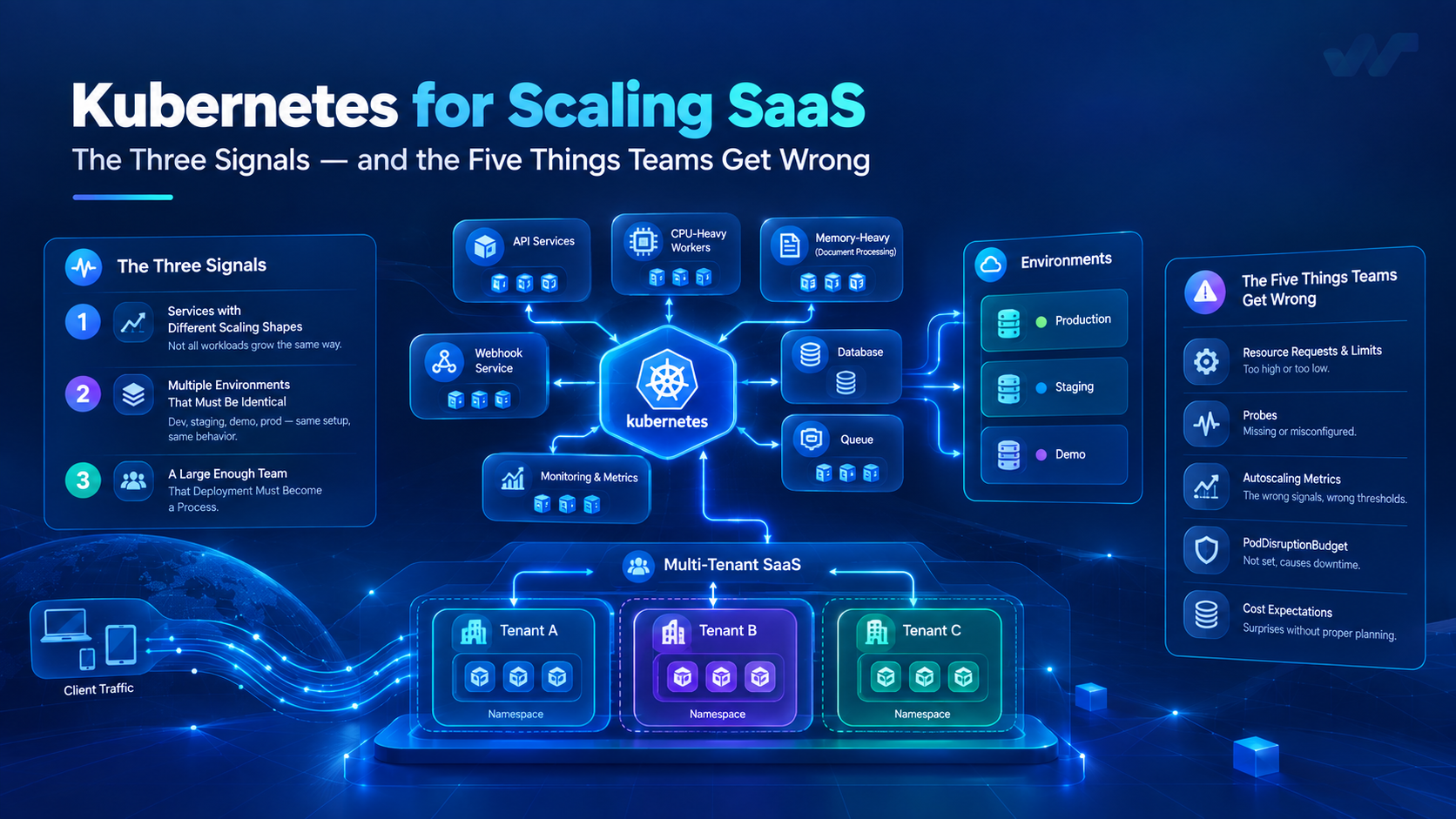
Three signals that you actually need it
Not one of these on its own. Two or three together is when the case becomes real.
One: services with genuinely different scaling shapes. A single application that scales as one unit does not need an orchestrator; it needs more instances of itself behind a load balancer. The case appears when your API is memory-bound, your workers are CPU-bound, your document renderer needs three times the memory of everything else and your webhook receiver is spiky. Scaling those independently is what Kubernetes is for.
Two: more than one environment that must be identical. Production, staging, a per-customer instance, a demo. The moment "it works in staging" stops being a reliable statement, the value of a declarative, version-controlled description of the whole environment is enormous. This is the signal we see undervalued most.
Three: a team large enough that "who deploys" is a question. With three engineers, deployment is a person. With fifteen across several services, it has to be a process with rollout, rollback and an audit trail, or you will spend a meaningful share of your week coordinating.
If none of these is true — one application, one environment, a small team — a managed platform or a few well-configured virtual machines will serve you better, and you will ship features instead of writing manifests. That is not a compromise; for that situation it is the correct architecture.
Choosing the multi-tenancy model first
This decision shapes everything else, and it is much harder to change later than teams expect. There are three practical models.
| Shared pool | Namespace per tenant | Cluster per tenant | |
|---|---|---|---|
| Isolation | Logical, in application code | Kubernetes-level: quotas, network policy, RBAC | Complete |
| Cost per tenant | Lowest | Moderate | Highest |
| Noisy neighbour | Handled in app | Contained by quotas | Impossible |
| Operational load | One environment | Grows with tenant count | Grows sharply |
| Per-tenant version | No | Possible | Yes |
| Fits | Self-serve, many small tenants | Enterprise tenants with isolation requirements | Regulatory or sovereignty requirements |
Most SaaS should start with a shared pool and keep the tenant boundary in the data model, enforced in one place and tested. The failure mode is a tenant filter applied per query, one of which eventually gets forgotten — which is not an availability incident, it is a data-exposure incident. Enforce it at a layer that cannot be bypassed and write the test that proves it.
Move a specific tenant to a namespace when that tenant's contract requires it or their load genuinely justifies it. Do not build namespace-per-tenant before anyone has asked: the operational cost is real and continuous, and it arrives long before the first customer who needed it.
Five things teams get wrong
These are the ones we see cause actual incidents, in rough order of frequency.
1. Resource requests and limits. This is the single biggest source of mysterious behaviour on Kubernetes.
Requests are what the scheduler uses to place the pod. Set them too low and the node is oversubscribed and everything on it degrades together. Set them too high and you pay for capacity nobody uses.
Limits are enforcement. A CPU limit does not slow a container down gracefully — it throttles it, in fixed periods, which shows up as latency spikes at p99 that correlate with nothing in your application logs. A memory limit does not throttle at all: exceeding it means the container is killed. Teams find pods restarting, look for a memory leak, and the real answer is a limit set to a number someone guessed during setup.
Measure actual usage before setting either. Set requests near the real steady state. Be deliberate about CPU limits — for latency-sensitive services, many teams reasonably set none and rely on requests plus node headroom. Always set memory limits, because an unbounded process takes the whole node down with it.
2. Probes that do not mean what they say. A liveness probe means restart me if this fails. A readiness probe means stop sending me traffic until this passes. Pointing liveness at a check that depends on the database means a brief database blip restarts every pod simultaneously, and now you have a thundering herd on a database that was just recovering. Liveness should test the process, not its dependencies. Readiness is where the dependency check belongs. Give slow-starting applications a startup probe rather than a generous liveness delay.
3. Autoscaling on the wrong metric. CPU is the default and frequently the wrong signal. If your service is IO-bound, CPU stays flat while queues grow and latency climbs — the autoscaler sees nothing. Scale workers on queue depth or lag; scale request services on concurrency or latency. And scaling pods against a database that is already the bottleneck makes things worse: you have added connections, not capacity.
4. No disruption budget. Node upgrades, rebalancing and scale-down all evict pods. Without a PodDisruptionBudget, a routine cluster operation can take down every replica of a service at once. One line of configuration; a genuinely bad afternoon without it.
5. Expecting autoscaling to reduce cost. Horizontal pod autoscaling changes pod count. If the nodes stay running, the bill does not move. Cost comes from bin-packing — right-sized requests so the scheduler fits more per node — plus cluster autoscaling, plus a sensible mix of instance types. Teams enable the HPA, see no saving, and conclude Kubernetes is expensive. The HPA was never the lever.
What we would not put on it
Your primary database. It is possible and it is well-trodden, but running a database on Kubernetes means you now operate both. Use a managed database unless you have a specific reason and someone whose job includes it.
A single application with one scaling shape. Covered above, and worth repeating because it is the most common premature adoption.
Anything you cannot observe. Kubernetes moves workloads. If you cannot tell which pod served a request, when it restarted and why, the platform's flexibility becomes an inability to reason about your own system. Centralised logs, metrics and traces are a prerequisite, not a follow-up task.
A pre-launch checklist
Before a cluster carries production traffic:
- Requests and limits set from measured usage, not guessed.
- Liveness, readiness and startup probes distinguished and correct.
PodDisruptionBudgeton every service with more than one replica.- Rollout strategy configured, and rollback rehearsed — not just enabled.
- Resource quotas per namespace, so one workload cannot starve the cluster.
- Network policy with a default deny, and explicit allows.
- Secrets from a real secret store, not committed manifests.
- Logs, metrics and traces reaching one place, with retention set.
- Node upgrade tested end to end while traffic is flowing.
- Capacity headroom for the loss of one node, deliberately chosen.
The honest summary
Kubernetes solves problems of heterogeneity — many services, many environments, many people — far more than problems of scale. A single service can be scaled a very long way without it.
Adopt it when you have the three signals. Pick the tenancy model before writing manifests. Set requests and limits from measurement. And remember the goal is not to run Kubernetes; it is to ship a product that stays up while it grows.
If you are weighing this for a product you are building, we are happy to look at it with you — including when the answer is that you do not need a cluster yet.
Get posts like this by email
Occasional engineering notes from the team. No marketing, and easy to leave.
Keep reading
Database Migration Without Downtime: A Practical Guide for Production Systems
Learn how to migrate production databases with minimal downtime, consistent data, and a reliable rollback plan. Explore schema changes, replication, data validation, and practical strategies for MySQL and PostgreSQL migrations.
14 min readEngineeringThe Hidden Cost of Enterprise Software: What Businesses Should Evaluate Before They Build, Buy, or Scale
Enterprise software costs go far beyond licenses and development. Discover how integration complexity, technical debt, infrastructure, and security affect total cost of ownership—and how to make smarter build, buy, or integrate decisions.
12 min readNext post
Building AI Agents That Survive Production: A Development Guide
An agent is a model in a loop with tools and a stopping condition. Everything hard about shipping one comes from that sentence — non-determinism, tool design, evaluation, cost, and what happens when retrieved text contains instructions. What we have learned building them.