
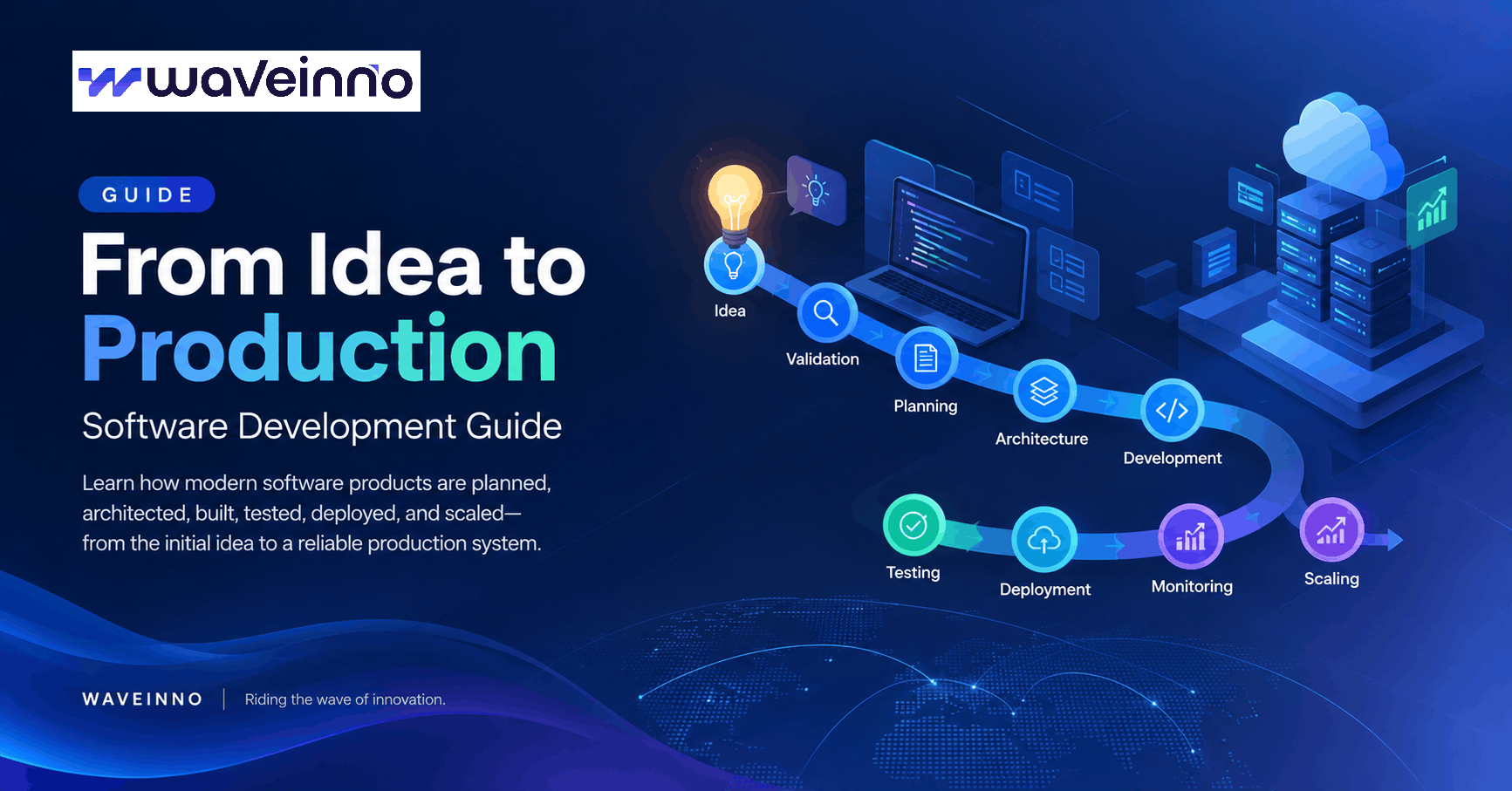
Software Development Guide: From Idea to Production
Building software is more than writing code.
A successful product needs the right problem, a clear product strategy, thoughtful architecture, reliable engineering, secure infrastructure, and a plan for growth.
Whether you are building a SaaS platform, web application, mobile app, internal business system, marketplace, or a connected IoT product, the journey usually follows the same fundamental path:
Idea → Validation → Planning → Architecture → Development → Testing → Deployment → Monitoring → Scaling
This guide explains what happens at each stage and how to make better technical decisions before investing heavily in development.
1. Start With the Problem, Not the Technology
One of the most common mistakes in software development is starting with technology.
Teams often begin with questions such as:
- Should we use React or Vue?
- PostgreSQL or MySQL?
- Python or Go?
- AWS or another cloud provider?
- Monolith or microservices?
These are important questions—but they should not be the first questions.
The first question should be:
What problem are we solving, and for whom?
A strong software product starts with a clearly defined problem.
Before writing code, identify:
- Who will use the product?
- What problem are they experiencing?
- How are they solving it today?
- What makes the current solution inefficient?
- What outcome should your product create?
- Why would someone pay for it?
Technology should support the product strategy—not replace it.
2. Validate the Idea
Not every technically possible product is worth building.
Before investing significant engineering resources, validate the idea.
A simple validation process can include:
Understand the users
Talk to potential users and understand their actual workflow.
Do not only ask:
"Would you use this product?"
Instead ask:
"How do you solve this problem today?"
Real behavior is usually more valuable than hypothetical feedback.
Identify the core use case
A product can eventually contain hundreds of features, but the initial version should solve one important problem extremely well.
For example:
Instead of building an entire business management platform immediately, start with the workflow that creates the highest value for the target customer.
Define the MVP
An MVP—Minimum Viable Product—is not necessarily a small or low-quality product.
It is the smallest product capable of validating the core business assumption.
The goal is learning, not simply shipping fewer features.
3. Define the Product Requirements
Once the problem is understood, convert it into clear requirements.
Requirements usually fall into two categories.
Functional requirements
These describe what the system should do.
Examples:
- User registration and authentication
- Product management
- Order processing
- Payment processing
- Notifications
- Reporting
- Search
- File management
- Role-based access control
Non-functional requirements
These describe how the system should behave.
Examples:
- Performance
- Security
- Availability
- Scalability
- Reliability
- Maintainability
- Observability
- Compliance
A system that has every feature but performs poorly or cannot scale with its users is not a successful product.
4. Design the System Architecture
Architecture is where product requirements become a technical system.
A modern application may contain several layers:
Users
  │
  ├── Web Application
  ├── Mobile Application
  └── Admin Portal
          │
          ▼
       API Layer
          │
   ┌──────┼─────────┐
   ▼      ▼         ▼
Database Cache   Object Storage
   │
   ▼
Background Workers
   │
   ▼
External Services
The architecture should be designed around the actual requirements.
For example:
- A simple internal application may only need a modular monolith.
- A growing SaaS platform may need background workers, caching, queues, and object storage.
- A high-throughput system may require specialized services.
- An IoT platform may need device communication, event processing, time-series data, and remote device management.
Don't over-engineer too early
Microservices are not automatically better than a monolith.
The best architecture is the simplest architecture that can reliably support the current product and its reasonably expected growth.
Architecture should evolve with the product.
5. Choose the Technology Stack
Technology decisions should follow requirements.
A modern web product may include:
Frontend
Frameworks such as:
- Next.js
- React
- Vue
Backend
Depending on the system:
- Python
- Go
- Node.js
- Java
- PHP
- .NET
Databases
Depending on the workload:
- PostgreSQL
- MySQL
- MongoDB
- Redis
- Specialized data stores
Infrastructure
Modern applications may use:
- Containers
- Cloud infrastructure
- Object storage
- Load balancers
- CDN
- CI/CD
- Monitoring
- Automated backups
There is no universally "best" technology stack.
The right stack is the one that fits the product's requirements, team capabilities, operational needs, and long-term strategy.
6. Design the User Experience
Good software is not only technically correct.
It should also be easy to understand and efficient to use.
Before development, define:
- User journeys
- Information architecture
- Navigation
- Key workflows
- Empty states
- Error states
- Loading states
- Mobile behavior
- Accessibility requirements
A good interface reduces the amount of thinking users need to do.
The best products often feel simple because the complexity has been handled behind the interface.
7. Build With Security From the Beginning
Security should not be added after development.
It should be part of the architecture.
Important areas include:
Authentication
Secure identity management, password handling, session management, and multi-factor authentication where appropriate.
Authorization
Users should only have access to the resources and actions they are permitted to use.
Data protection
Sensitive data should be protected both in transit and at rest.
Application security
Teams should consider:
- SQL injection
- XSS
- CSRF
- Broken access control
- Insecure file uploads
- API abuse
- Rate limiting
- Secrets management
Infrastructure security
Production systems should also include:
- Network isolation
- Secure credentials
- Firewall rules
- Logging
- Monitoring
- Backups
- Disaster recovery
Security is a continuous engineering responsibility—not a final checklist.
8. Develop in Iterations
Large software projects become difficult when everything is built at once.
A better approach is iterative development.
A typical cycle looks like:
Plan
  ↓
Build
  ↓
Test
  ↓
Review
  ↓
Deploy
  ↓
Measure
  ↓
Improve
Break the product into meaningful increments.
For example:
Phase 1
Authentication + core workflow
Phase 2
Dashboard + reporting
Phase 3
Payments + notifications
Phase 4
Automation + integrations
Phase 5
Performance + scaling
This allows the team to learn from real usage instead of making every decision based on assumptions.
9. Test Before Production
Testing is not only about finding bugs.
It is about reducing uncertainty.
Depending on the product, testing can include:
Unit testing
Tests individual functions or components.
Integration testing
Tests interactions between services or modules.
API testing
Verifies API behavior, validation, authentication, and error handling.
End-to-end testing
Tests real user workflows from beginning to end.
Performance testing
Measures how the system behaves under realistic and peak workloads.
Security testing
Identifies vulnerabilities and access-control problems.
Testing should happen throughout development—not only immediately before launch.
10. Prepare the Production Environment
A production system needs more than application code.
A typical production environment may include:
Internet
   │
   ▼
CDN / Load Balancer
   │
   ▼
Application
   │
   ├── API
   ├── Workers
   └── Scheduled Jobs
        │
        ├── Database
        ├── Cache
        └── Object Storage
You also need operational capabilities such as:
- Automated deployment
- Database migrations
- Backups
- Health checks
- Error tracking
- Logs
- Metrics
- Alerts
- Rollback procedures
A product is not production-ready simply because it works on a developer's computer.
11. Monitor the Product After Launch
Launching is the beginning of the next phase.
Production monitoring helps answer questions such as:
- Is the application available?
- Are APIs responding quickly?
- Are errors increasing?
- Which features are being used?
- Are users completing important workflows?
- Is infrastructure capacity sufficient?
- Are database queries becoming slow?
Observability generally includes three major areas:
Logs
What happened?
Metrics
How is the system performing?
Traces
Where is time being spent across distributed requests?
The goal is to detect problems before they become major incidents.
12. Scale Based on Evidence
Scaling does not always mean adding more servers.
First identify the actual bottleneck.
It could be:
- Database queries
- Application code
- Network latency
- External APIs
- Memory usage
- CPU usage
- Storage
- Background jobs
- Poor caching strategy
Common optimization techniques include:
- Database indexing
- Query optimization
- Caching
- Connection pooling
- Queue-based processing
- Horizontal scaling
- CDN usage
- Asynchronous processing
The right scaling strategy depends on where the system is actually constrained.
13. Technical Debt Is Part of the Journey
Every successful product accumulates some technical debt.
Technical debt can come from:
- Fast MVP development
- Changing requirements
- Temporary workarounds
- Legacy dependencies
- Growing codebases
- Architectural decisions that no longer fit
The goal is not to eliminate technical debt completely.
The goal is to manage it intentionally.
A healthy engineering team continuously balances:
New features + Reliability + Security + Performance + Maintainability
14. Build for the Business, Not Just the Codebase
A technically excellent product can still fail.
Why?
Because software success is not determined only by architecture, code quality, or scalability.
A product must answer three questions:
Can we build it?
This is the engineering question.
Should we build it?
This is the product question.
Why would someone pay for it?
This is the business question.
Strong software development connects all three.
15. A Practical Software Development Checklist
Before launching a new software product, consider this checklist:
Product
- Problem clearly defined
- Target users identified
- Core use case validated
- MVP scope defined
- Success metrics established
Design
- User journeys mapped
- UI/UX designed
- Responsive experience considered
- Accessibility considered
Engineering
- Architecture defined
- Technology stack selected
- Database designed
- API contracts defined
- Authentication implemented
- Authorization implemented
Security
- Secrets protected
- Input validation implemented
- Access controls tested
- Rate limiting considered
- Data protection implemented
Quality
- Unit tests
- Integration tests
- API tests
- End-to-end tests
- Performance testing
Production
- CI/CD configured
- Monitoring enabled
- Logging configured
- Backups configured
- Alerts configured
- Disaster recovery plan defined
Growth
- Performance bottlenecks identified
- Scaling strategy considered
- Technical debt tracked
- Product analytics implemented
Final Thoughts
Building software is a journey rather than a single development phase.
The strongest products are built through a continuous cycle of:
Understand → Design → Build → Test → Launch → Measure → Improve
The technology will change.
Frameworks will change.
Infrastructure will change.
But the fundamental principle remains the same:
Build technology around real problems, real users, and measurable outcomes.
At WAVEINNO, we approach software development as product engineering—not simply writing code. From web and mobile applications to SaaS platforms, business systems, APIs, and connected products, the objective is to build technology that can operate reliably today and evolve with the business tomorrow.
Have a product idea?
Start with the problem. Then build the right technology around it.
Get posts like this by email
Occasional engineering notes from the team. No marketing, and easy to leave.
Keep reading
Multi-Tenant SaaS Architecture: A Practical Guide to Building Scalable Software
A practical guide to multi-tenant SaaS architecture, covering tenant isolation, database strategies, authentication, security, scalability, and production infrastructure.
GuidesCustom ERP vs SaaS ERP in Bangladesh: A Decision Framework, Not a Sales Pitch
We build both, which means we have no reason to sell you the wrong one. Here is the framework we actually use with clients — what forces a custom build in Bangladesh, what a SaaS licence really costs over five years, and why most companies end up somewhere in between.
9 min readNext post
Multi-Tenant SaaS Architecture: A Practical Guide to Building Scalable Software
A practical guide to multi-tenant SaaS architecture, covering tenant isolation, database strategies, authentication, security, scalability, and production infrastructure.